
Event Calendar Plugin for Joplin
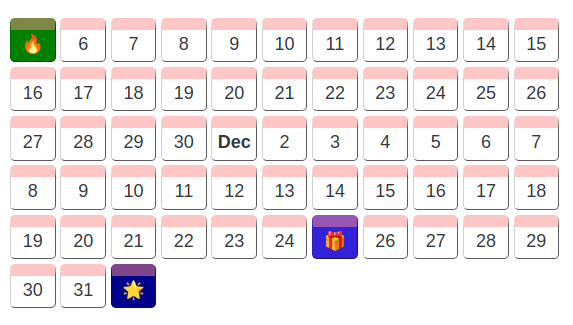
This plugin creates a calendar view of events that have been specified using the YAML syntax within a fenced block.
About
- The main feature of this calendar is the ability to change the view; you can group events by day, week or by month.
- Events do not have to placed in order.
- There is no need to specify a start and end date; the calendar will automatically calibrate the view depending on the dates found in the events
Usage
-
To setup the calendar, first create a fenced block with the text
joplin-plugin-event-calendaras the identifier -
Specify what type of grouping you would like with the
groupkey,dfor day,wfor week,mfor monthgroup: d # (optional) d / w /m -
Specify each event with the
eventskeyevents: - date: yyyy-mm-dd # (required) icon: 🙂 # (optional) event icon title: Ahoi # (required) event title text: hoi # (optional) additional event details bgColor: red # (optional) if not specified, a random one will be assigned
Example
```joplin-plugin-event-calendar
group: d
events:
- date: 2012-11-05
  icon: 🔥
  title: Bonfire night
- date: 2012-12-25
  icon: 🎁
  title: Time for a gift!
- date: 2013-1-1
  icon: 🌟
  title: New year's day
```
Acknowledgements
This project was inspired by the Joplin Life Calendar Plugin